A note before the draft
The post below was drafted and ready to publish before I learned, during the approval process, that a tool already existed which does more and does it better. I should have researched what was already available before I started building.
The GitHub repository is now archived. I'm still publishing this post as a reminder that we can all make mistakes, rush into things and learn from them.
The PPTB Record Finder
Sometimes a log gives you useful context. At other times, a client sends you a GUID and not much else. You have an ID to investigate, but you don't know which table it belongs to.
I've needed to find a record from a GUID before, and I needed to do it again today. So I've built Record Finder, a small tool for Power Platform ToolBox that does the table checking for me.
What Record Finder does
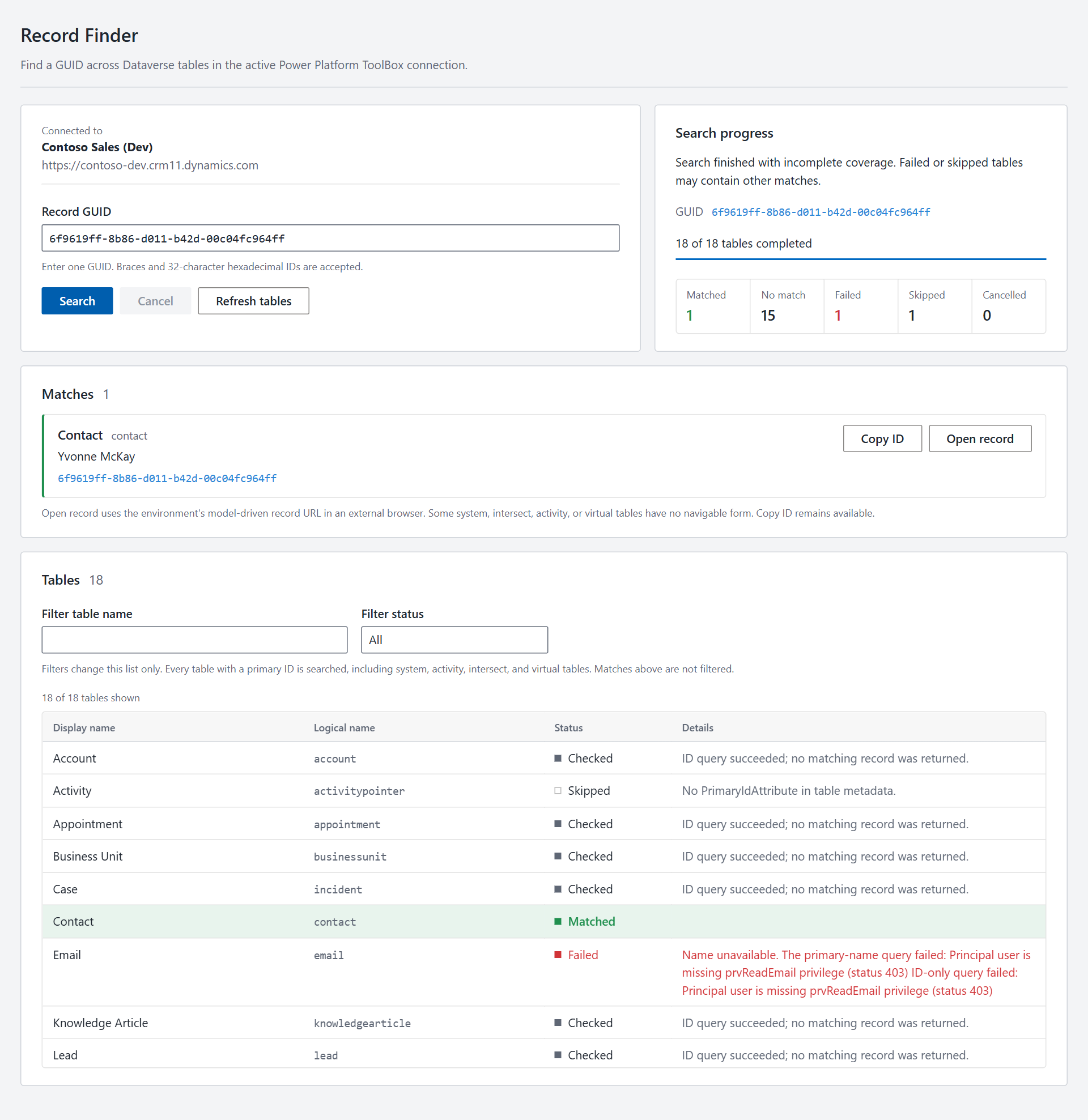
Give Record Finder one GUID and it checks the tables in your active Dataverse connection for a record with that primary ID. It uses each table's actual primary ID column, rather than assuming they all have the same name.
It attempts every table with a primary ID, including system, activity, intersect and virtual tables. It keeps looking after a match, so you can see if the same ID exists in more than one table. Tables without a primary ID are skipped.
The search is read-only. It looks for the GUID as a record's primary ID, not in every GUID-valued column. For example, it won't find a GUID that only appears in a lookup.
Tables are checked one at a time, and the progress list shows which ones matched, were checked without a match, failed or were skipped. You can also cancel a search and keep the results from completed tables.
Using the tool
- Open Record Finder in Power Platform ToolBox and select a Dataverse connection.
- Wait for the table metadata to load.
- Enter one GUID and select Search.
- Review the matches and table statuses. Use Copy ID or Open record on a match.
You can enter a hyphenated GUID, a GUID in braces, or 32 hexadecimal characters. Paste the GUID itself rather than a URL containing it.
For each match, the tool shows the table and, when available, the record's primary name. Open record tries to open its model-driven record URL in a browser. Some tables don't have a navigable form, so that link may not work even when the search found a match.
What a search result tells you
Record Finder uses the permissions of your current connection, so it can only return records your account can access. No match does not necessarily mean a record is absent. It might not be visible to you.
It's also worth checking for failed or skipped tables. If a table fails, is skipped or has not been checked because you cancelled the search, the tool cannot tell you whether it contains a match. The status list shows where that happened.
Get Record Finder
The source and instructions are on GitHub.